Blog: Dive Time Game

Updated: Apr 23
Dive Time: Sprint 6
April 23, 2026
For sprint 6, I worked on polishing our game's visuals and improving how the global game state is handled. I also fully animated the player character, added a proper dive/resurface transition handler, created custom data assets for holding mob configuration settings, and added parallax backgrounds.
To start the sprint off, I worked on implementing our game's player model into the player controller. We had previously been using Unreal Engine 5's default player model, so it was important that I got this done as we got closer to the end of our development period.
The player's new model is controlled by a primary animation blueprint that handles animation transitions and the fetching of the player controller's state. This allows the animator to scale its walk cycle speed with the player's speed. The animator's state tree ensures that the player's animations are cycled through when appropriate.


I also created a custom aim offset asset for the player model so they could aim up and down. All I had to do was create 3 different poses that the aim offset would interpolate between to then generate rotation offsets for the animator to use.


After the animator was done, I properly implemented mob deespawning. Previously, the mob spawner would only stop spawning mobs when the player returned to the dock. It wouldn't however, remove any extra mobs that were still alive. This was a problem since entering the water each time is supposed to reset the ocean.
To fix this, I simply made the mob manager keep track of where the player is at any given time. If the player went above the water's surface level, it would delete all currently active mobs. While this worked for the time, I eventually made it hook into a delegate from the custom Game State class I made that's called when the player transitions to/from the ocean.

With mob despawning working, I then went to work on how the game holds and processes global states. However, me adding to a struct in the World Settings class caused all of the levels to become corrupted. This was due to the fact that each level tried and failed to cast the previous struct into the new one, crashing the editor upon trying to load or even duplicate the levels.
Once I fixed the corrupted levels, I decided to move all of the variables in the World Settings into a custom data asset. The World Settings would then only have a reference to an instance of this data asset class. Having the World Settings simply hold a pointer to a data asset meant that I no longer needed to worry about corruptions when adding to classes or structs involved with the world's configuration.
This new World Config also had one data table reference for each underwater region. These data tables used a custom data table row that holds a mob's day and night blueprints, spawn chance, spawn school count, and spawn school size. Changing the world configuration to an asset-driven workflow makes it much easier for my team's other developers to adjust them as needed, since they're much easier to find and use across multiple levels.


To store and manage the new data fields from the World Config, I created custom Game Mode and Game State classes. In tandem, these classes both hold and process our game's world state and the global events that can occur, like the player travelling into a new region. The custom Game State also holds a reference to another class I made called the Mob Spawn Map.
The Mob Spawn Map takes all of the Mob Spawn data rows from each of the World Config's data tables and separates all of them by spawn region and spawn time. Each region combination also stores the total weight of the spawnable mobs in its pool.
I also updated the Mob Spawner and Mob Manager to interface with these new data systems. The Mob Spawner now chooses what pool of spawnable mobs it can spawn based on the game state's current time frame and active region. The Mob Manager only spawns mobs when the transition delegate is called and properly despawns mobs when the transition delegate is called again.


After overhauling our game's global data systems, I then implemented the diving animation/transition system for when the player enters and exits the ocean. Instead of walking on/off a ramp, the player must now press the E key near the ocean to enter or exit it. This makes the action feel more impactful and allows for us to better pace the game.


Finally, I worked on adding parallax backgrounds to our game's level. One of our 2D artists made custom layered backgrounds for each of our game's regions, and I was tasked with adding them. Since there was both a day and night variant for each region, I needed to make a system that could be updated once to affect all of the background layers.
To do this, I made a master material for all of the background panels to use. This material held different textures for the day and night, allowing the materials to be switched on the fly without needing to reassign the textures. The master material then holds a reference to a Material Parameter Collection, an asset that lets multiple materials share variables, that contains a float value. This float value is modified by a blueprint and is read in by the material and used to switch between the day and night textures.


With our second to last sprint completed, all we have left is our final sprint. While I was a bit nervous before about what we'll be able to get into our project, I'm confident that we will have a fantastic project by the end of this development cycle.
For our final sprint, I will be focusing my efforts towards polishing our game's features and visual aesthetic. Working with my other programmer, we'll ensure that all of the visual and auditory elements produced by our team are able to be integrated into the game. I'm really excited to see how our game finally turns out.
Dive Time: Sprint 5
April 9, 2026
For sprint 5, I primarily worked on revamping the harpoon gun ability to meet our designer's vision. I also took the time to improve the feel of swimming in our game and helped my team's other programmer convert his item blueprint into a component.
At the sprint's kickoff, I was told by my designer and producer that I needed to improve the general feel of swimming in our game. Previously, the swimming functionality was very barebones and didn't feel like swimming. Many play testers remarked that it was more akin to walking in air. The player would also float indefinitely in the last direction they moved towards.
To remedy these issues, I took the time to adjust our player controller's acceleration and deceleration. The combination of less snappy movement and a strong deceleration factor made the swimming far more natural. I also added a very slight swaying effect to the player to simulate a slight current. Besides the lack of animations, my producer and designer were very pleased with the results.

With swimming in a good spot, I turned my focus towards what I would be working on for the rest of the sprint: revamping the harpoon gun. For a long time, the harpoon gun was in a similarly unpolished state to the player's swimming. All it did was launch bolt projectiles that could damage mobs.
I started the revamp by making the harpoon gun reuse the same bolt. This would make it much easier for the harpoon gun to reel in killed mobs, since the bolt could be treated as an anchor for any mobs it kills. The bolt was also given a reference to the harpoon gun so that it knew where to move back towards.

With the harpoon gun blueprint done, I started to overhaul the harpoon bolt. The bolt would contain the majority of the harpoon gun ability's logic, as it would be responsible for its own motion and interacting with whatever it hits.
I started by creating multiple functions to make the bolt launch from the gun and retract to the gun. The bolt is unparented from the gun upon launching to ensure that it moves independently from the player's rotation. The bolt's projectile component moves the bolt in the direction it was fired.

When the bolt hits an object, its projectile component will be disabled and its physics enabled. This allows the bolt to 'bounce' off surfaces or mobs that it doesn't kill. When the bolt starts to retract after a delay, its physics, collision, and projectile are disabled so that it can seamlessly move back to its starting location without getting stuck.

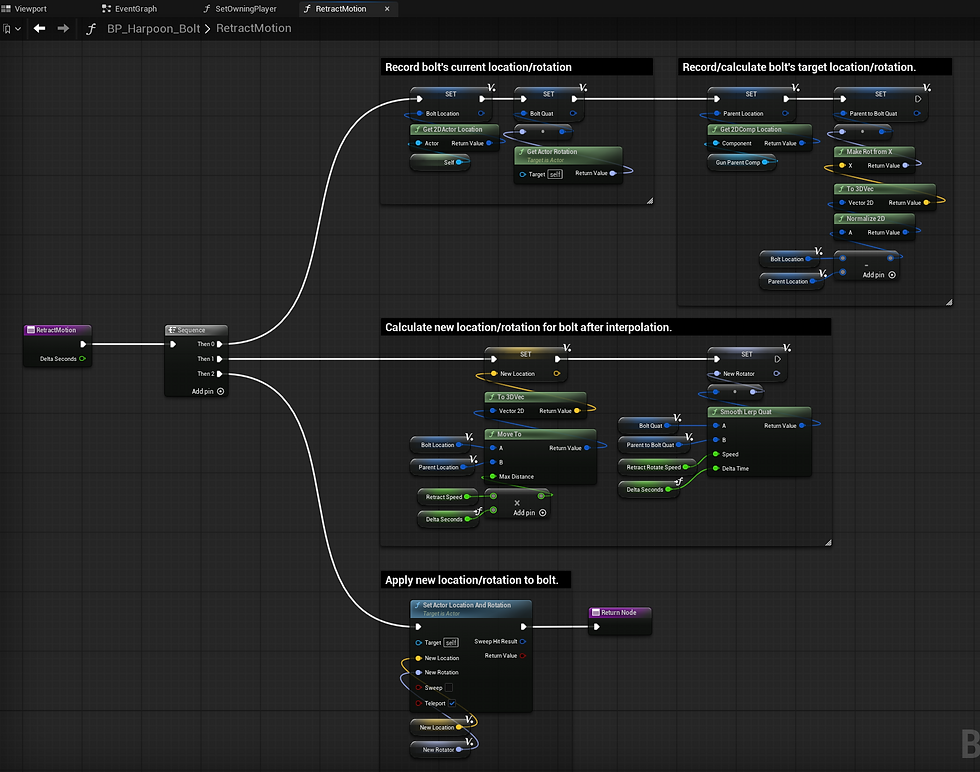

Together, these functions allow the bolt to be launched from the gun and retract when appropriate. I also added a spline mesh to make the bolt's retracting motion look more natural.

After completing the harpoon bolt's motion logic, I adjusted how the bolt interacts with mobs. This final adjustment would allow the harpoon gun to properly interact with mobs and the world as my team's designer requested.
Upon hitting a mob, the harpoon bolt will attempt to damage it. If the bolt has enough armor piercing, it will apply the bolt's damage. The bolt will then bounce off the mob as if it hit any other object. However, if the bolt kills the mob, or if the hit object has the 'Attachable' tag, the bolt will instead attach the hit actor to itself, disabling its physics and collision in the process. It then immediately starts retracting, bypassing the typical delay between hitting something and retracting.
Upon fully retracting to the harpoon gun, the attached object is unparented from the bolt and the bolt is parented to the gun. A cooldown then starts on the harpoon gun, after which the bolt can be launched again.


The harpoon gun is now in a far better state than it used to be. The only issue was the fact that boids couldn't be collected as items yet. My team's other programmer created an item and inventory system for our game, but all items that could be picked up needed to inherit from a base item actor.
I ended up helping my team's other programmer create a component that does the same thing as the item actor, but through its own logic loop. It inherits from a sphere collider so that it can detect the player on its own. The component also has parameters that can make it hold multiple items or even delete its owning actor to upon transferring itself to the player's inventory.

With this sprint complete, we only have 2 more to go. After talking to my team's designer and producer, we've determined that we'll likely need to cut certain features from our designer's original plan. However, I am still confident that we're going to make a great game that we can all be proud of.
For sprint 6, I'm going to be shifting a lot of my effort towards polish and bugfixes. I'll add many of the assets our team's artists have been making along with revamping the player's oxygen system and gear upgrades.
Dive Time: Sprint 4
March 26, 2026
For sprint 4, I worked on creating an ability blueprint system for the player character. I created a mob class that boids now inherit from, updated boid movement to be much smoother, and developed a dynamic mob spawning subsystem. I also fully restructured the project's c++ file architecture to be easier to navigate.
The first feature I worked on was the introduction of a blueprint ability system. This system would allow my fellow programmer and I to create modular abilities that can be attached to and used by the player character at runtime. It would also allow us to develop multiple abilities at the same time without having to worry about overriding one-another's code when merging branches.
To accomplish this, I created a base blueprint ability that abilities will inherit from. The base ability blueprint itself inherits an interface so that children of the base ability can implement their own versions of the activate and deactivate functions.

I also took the time to separate the player's movement logic from their shooter logic into two separate blueprints. The shooter character, being a child of the movement character, inherits all of the movement logic. Doing this allowed for my teammate and I to work on the movement and abilities at the same time without having to worry about merge conflicts, letting us work much more efficiently.

With the character logic compartmentalized, I realized that the boids would also benefit from being compartmentalized in a similar fashion. While most of the wildlife in our game will be boids, there are also plans for crab creatures that don't behave like boids. However, a lot of the currently existing subsystems for spawning, despawning, and general logic were all tailored towards boids.
Replacing the boid class with a generic mob class that boids will inherit from will make it much easier to integrate crabs into the pre-existing subsystems. Boids will also still work with the subsystems, as they now inherit from the mob class.


Since each type of mob will have their own movement logic, I had to move the boid's schooling logic into the boid class itself from mob manager subsystem. I was also able to improve the way boids oriented themselves in the process, since I was already working in the boid's movement tick function.

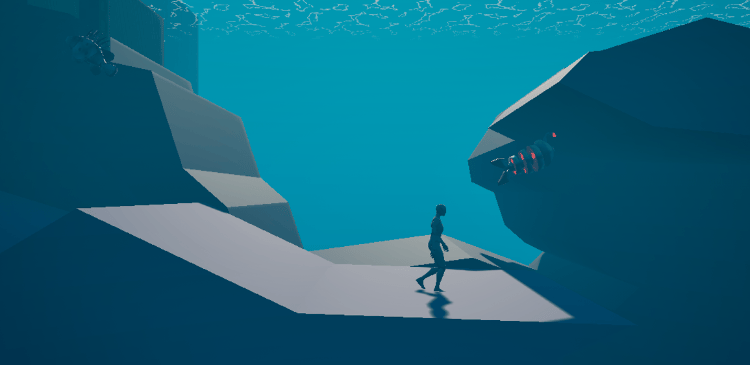
To work with the new subsystems, the boid pool needed to be turned into a mob pool, since all mob types would be spawned and processed by the subsystems. I realized, though, that I could optimize the pool by having the mob manager create a pool for each specific type of mob. This way, every mob would be automatically sorted by species rather than by order of creation, making it faster for mobs to only test against the specific mobs they're allowed to interact with.

Having created the new mob system for creatures to use, my next goal was to develop a more elaborate spawning system for mobs. The previous 'spawn system' simply spawned 10 of each boid from a designated list. Since our game needed dynamic spawning and despawning, this was not going to cut it.
The system I ended up creating mirrors how Terraria handles the spawning of npcs. Each tick, the spawner rolls to see if a mob should be spawned on that frame. The rate at which mobs are spawned is mostly framerate-independent as it scales based on the current frame's delta time. This ensures that players with higher framerates aren't swarmed in comparison to players with lower end hardware.
If the aforementioned roll is deemed a success, the spawner then fetches a random mob from a list based on the biome that the player is currently in. This allows for designers to easily control which mobs can spawn where without having to program anything themselves. Upon being spawned, mobs are placed barely outside of the player's field of view pointed towards them so that they immediately swim into the player's view.

To wrap things up, I made the choice to fully reorganize our project's C++ file structure. Previously, the file structure was rather hectic with the amount of subfolders it had. After looking into how Epic Games recommends organizing Unreal Engine 5 projects, I renamed and moved all of the C++ files into a much more readable format.


While this sprint was lighter than others, I'm still very happy with how it went. For our next sprint, I'm going to finish up the AI systems for mobs and boids. I'll implement a despawning system for mobs out of range, a system for picking up dead fish, and a day/night system that affects which fish are spawned. We're starting to get close to the end, and I'm really excited for how our project will turn out.
Dive Time: Sprint 3
March 5, 2026
During sprint 3, I spent most of my time developing multiple materials and post processing effects to make our game's water more immersive. I also turned the body part blueprint I made into a custom component written in C++, allowing me to make fish take damage and be killed by attacks.
My first task for this sprint was to create the necessary materials and effects for our game's water. To do this, I divided it into 4 different materials and post processing effects:
The water surface,
The underwater caustics,
The underwater fog, and
The transition effect.
Dividing the water into these 4 elements will make it much easier for me to tune and refine each element as needed.
Starting with the water surface, it makes heavy use of the depth buffer to emulate both shallow and deep parts of the water. However, instead of using the depth to determine the color, I use it to calculate the position of geometry behind the water. I then use that position's height relative to the water's height as the effective depth. This allows for the water to be much more consistent regardless of viewing angle.


Since our game has a retro aesthetic, I also made the water sample textures using pixelated world coordinates as the UVs. I opted to pixelate the UVs rather than the textures themselves so that textures can move across the water surface while adhering to the pixelated coordinates. It makes the water look more like an intricate animated texture rather than a scrolling image.


While the water looked good with the depth effect and sea foam, it lacked the waves one would expect to see across a vast ocean. I remedied this by creating a material function that creates a fractal normal from a given normal texture. This made the water much more mesmerizing to look at while still adhering to the retro aesthetic.

The material function also expects the given normal map to have a heightmap packed in its alpha channel. This allows the function to additionally generate a height value that the surface material uses to displace the water mesh's vertices, breaking up the shoreline.

After the above water surface material, I started work on the underwater caustics. This material would go on an inverted plane right below the water to visualize where the water's surface is while the player is submerged. It helps to both separate the sky from the sea and help the player roughly gauge their depth from visuals alone.
Thankfully, I was able to reuse a lot of the code and material functions used for the water surface material. The pixelated depth and sea foam effects were the majority of the underwater material's code, with some additional logic to display the caustic effects. My efforts to compartmentalize my code made developing these effects much faster.


With the surface materials done, I then moved to developing the underwater effects. A big aspect of the underwater post processing that I wanted to get right was the angle-dependent shading. In the real world, the color of the ocean while submerged is dependent on the angle you view it at. Looking towards the bottom of the ocean results in much deeper colors than when you look towards the surface, as that's where light propagates from.

To emulate this, the post processing effect fetches the position of world geometry per pixel, with a given maximum distance. The water's color is shifted based on the height of this calculated position, and its opacity scales proportionally with the distance from the position to the camera.

Overall, this allows for the water to change colors gradually and across the screen, rather than being an immediate shift that affects the whole screen at once. The colors and maximum distance used for sampling can also be adjusted, making it easy to fine-tune.

With the main elements of the water effect complete, I worked on implementing the final effect: a transitional effect when submerging into or emerging from the water. Without this effect, the seam between the above water plane and below water plane is very obvious, and results in a choppy transition when going from the surface to below the water.
This effect reuses a lot of the code from the underwater post processing effect, but in reverse: It fetches a location very close to the camera and adjusts the transition band's opacity based on how close it is to a designated water height, hiding the seam between the surface and underwater effects.


The water effects were my top priority this sprint, but I also had other things that needed to be done. Namely, I needed to implement the body part system into the boids. I had initially planned to use the body part blueprints I made in an earlier sprint, but enough time using C++ had made me realize it would be considerably more intuitive to recreate the blueprint in C++ as a designated component.
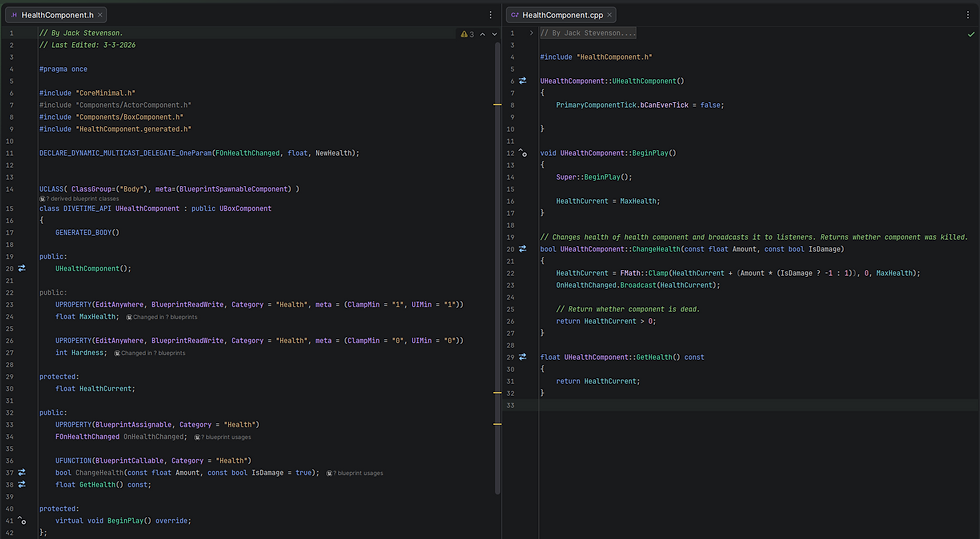
Turning the blueprints into a C++ component made it far easier for me to attach them to blueprints as needed. It also made it easier for me to implement functions that both C++ classes and blueprints will be able to use. As an example of this, implementing the health component into the boids and my other programmer's harpoon system took only 30 minutes.

Finally, I coordinated with my level designer and the other programmer to fully reorganize our project's files entirely. Previously, things were starting to get a bit messy due to a lack of a unified file structure. Our work would be scattered around in a less-than-ideal manner. With our new file structure, it's considerably easier for all of us to maintain a clean project and find specific assets when needed.

For our next sprint, I'm going to work on separating the player character's movement code from its harpoon shooting code to make our game's systems more modular. I will also start to develop more intricate fish behaviors and implement dynamic spawning and despawning for the boids.
Dive Time: Sprint 2
February 18, 2026
For this sprint, I enabled the C++ workflow for our Unreal Engine 5 project and implemented the boid system. I created multiple subsystems to spawn and manage the boids, along with a plethora of structs to better organize the parameters of the boids and the subsystems.
Starting things off, I had to first enable C++ in our project. Unfortunately, getting Unreal Engine 5's C++ workflow to work is a bit of a convoluted process, and everyone on our team would need to go through the same steps if they wanted to open the project. While Epic's online guides did help, I had to find more experienced programmers to assist me in the process. After everything was done, I was ready to get started on the boids.

Similarly to the body part system, I created a basic class map for the boids system. These class maps help me get a general idea of how I'm going to lay out the system in the engine. It makes planning ahead much easier as opposed to just winging it. I adjusted the class map as I went to help me keep track of my system's overall design.

With the class map done, I got into Unreal Engine 5 and started to program the required classes for the boid system. I had to break down the implementation of the boid system into multiple parts, as I wanted the system to be fairly modular. This would make it easier for me to adjust the boid system later when extra functionality is needed.
For many of the boid system's classes, I made frequent use of structs to handle parameters. These structs dramatically reduced the volume of code in each system while also automatically organizing the details panel in the editor. Many of these structs can also be reused in other places, reducing the total amount of code I needed to develop.

For boid spawning and managing, I made use of world subsystems. A friend had recommended I looked into Unreal Engine 5's world subsystem class after I talked to him about my work. World subsystems are automatically instantiated once a level is loaded and are deleted/recreated once another level is loaded. They also automatically run each tick, making them the perfect class for the boid manager to inherit from, as only one system needs to exist per level.

With the base classes for the boid system implemented, my final goal for the sprint was to spawn and move the boids in the scene. While spawning the boids was fairly easy, moving them was far more difficult. I initially had troubles with how I was handling references to the boids in the boid manager script. After looking it up, though, I was able to implement the three rules of boid flocking into the system.
Almost immediately, it was looking almost exactly as I pictured it to. The boids would try to swim alongside one another while also keeping an appropriate distance. The boids could also be configured to run towards or away from the player, giving them the impression of being aware of the player's existence. The boid spawner's list-based spawn system also meant that multiple unique species could be spawned and simulated at the same time, allowing for much more interesting scenarios.


Next sprint, I'm going to work on creating the surface materials and post process effects for water-related effects to help our game feel livelier. I'm also going to implement the body part system and coordinate with my team's other programmer to ensure the harpoons can damage and kill the boids.
Dive Time: Sprint 1
February 2, 2026
Dive Time is a swimming side-scroller shooter, where you must navigate deep ocean depths and hunt valuable fish all while not drowning or succumbing to hostile wildlife. The deeper you go, the stranger fish get and the worse pollution becomes. You purchase upgrades with the money you make by selling fish, allowing you to dive deeper and survive longer.
Katherine Jackson, our team's lead designer, created this game concept and assembled a team of 10 artists, animators, and programmers, including me. For this project, I am designated as the lead programmer, and I am going to be in charge of developing intricate systems alongside another programmer that I'll coordinate with closely.
To start things off, I created the base project files and GitHub for our game. We're going to be using Unreal Engine 5.7.2, which I'm excited to get more experience with. Before I created the GitHub for our project, though, I wanted to first optimize our project to ensure it ran as well as it could using a guide I had found online.
This guide helped me achieve far greater performance for our product, as well as reduce shader compile times during development. I was able to disable many expensive rendering features (Lumen, Nanite, Substrate, etc.) without compromising the game's visual integrity. After switching the rendering API to DirectX11 with the Forward Renderer, I saw a roughly 35% performance increase across the board. The removal of many unnecessary packages also helped with cutting down on the project's file size.


Once the project was uploaded to GitHub, I made a simple class map for our project's AI system. I recognized that, while the architecture of these systems will change over time, it would help to have a general idea of where to start. Using draw.io to create a class map also made it easier for me to communicate the core design concept with my other team members.
The design for characters in our game is primarily based on Helldivers 2's body part/damage system. In Helldivers 2, characters are comprised of many parts that can be individually damaged. These parts vary in size, shape, health, armor, and whether their destruction should kill its owner. We're going to use a simplified implementation to make combat feel more engaging by encouraging players to aim for certain weak points on wildlife.

Implementing these classes into the Unreal Engine 5 was fairly straight forward. Through blueprints, I was able to create the required base classes that the player and other dynamic characters will use to allow for more sophisticated interactions.


After these classes had been implemented, I took the time to think about how wildlife behavior should be handled in our game. Since most of the non-player characters will be fish, a solution will be needed that allows fish-like characters to navigate around underwater obstacles with natural looking behavior.
My team and I eventually decided that a boid simulation would be the most appropriate way to emulate fish-like behavior. A boid simulation is a type of algorithm that attempts to imitate how flocking & herding animals behave with three rules: avoidance, cohesion, and alignment. These simple rules give way to seemingly complex and fish-like behavior while also allowing them to interact with obstacles.
For the next sprint, I will be implementing a boid system using C++ in Unreal Engine 5. This will allow wildlife to school and behave as a flock without any performance concerns. While I don't have experience with writing C++ code in Unreal Engine 5, I am excited to learn the ins and outs of this new workflow.
